
Test automation ROI: how to calculate it for a small team
How to calculate test automation ROI: the costs to count, a worked example with figures, the mistakes that inflate it, and when a small team should wait.
 By Kris, Co-founder and Senior Software Architect
 Test automation ROI is the return a team gets from the money and hours it puts into automated tests, measured against what manual testing costs today. Most teams get the calculation wrong in the same direction: they count the hours saved and forget the hours spent keeping the suite alive. This guide walks through the full calculation with a worked example, the mistakes that inflate the number, and the point at which a small team is better off not automating yet.
Why test automation ROI calculations go wrong
The usual pitch is a single line: “We will save 200 hours per release.” That number is real, but it is only one side of the ledger. Automated tests cost money to write, cost more money to maintain as the product changes, and return nothing on the flows they do not cover.
Three things are missing from most calculations:
- Maintenance. A test that checks the checkout page breaks the next time the checkout page changes. In our experience, teams that automate early spend a large share of their testing time repairing tests rather than finding bugs.
- Coverage you will not reach. Automation covers the flows you wrote tests for. The bugs that embarrass a team at launch are usually in the flows nobody thought to write a test for.
- Judgment. An automated test reports pass or fail. It does not notice that a total is wrong, that a confirmation email went to the wrong address, or that a page a user should not see is reachable. Someone still has to look.
A useful ROI calculation puts all of those on the cost side before it counts the savings.
The three value streams to count
When a calculation does come out positive, the value tends to arrive in three forms, and only the first is hours.
- Direct savings. Manual hours that automation replaces, at the loaded cost of the people doing them.
- Quality value. Bugs caught before release that would otherwise have reached customers. This is harder to price, so estimate it conservatively or leave it out of the headline figure.
- Speed. Faster feedback lets a team release more often. This matters most for teams already shipping weekly or faster, and least for teams releasing monthly.
A worked example
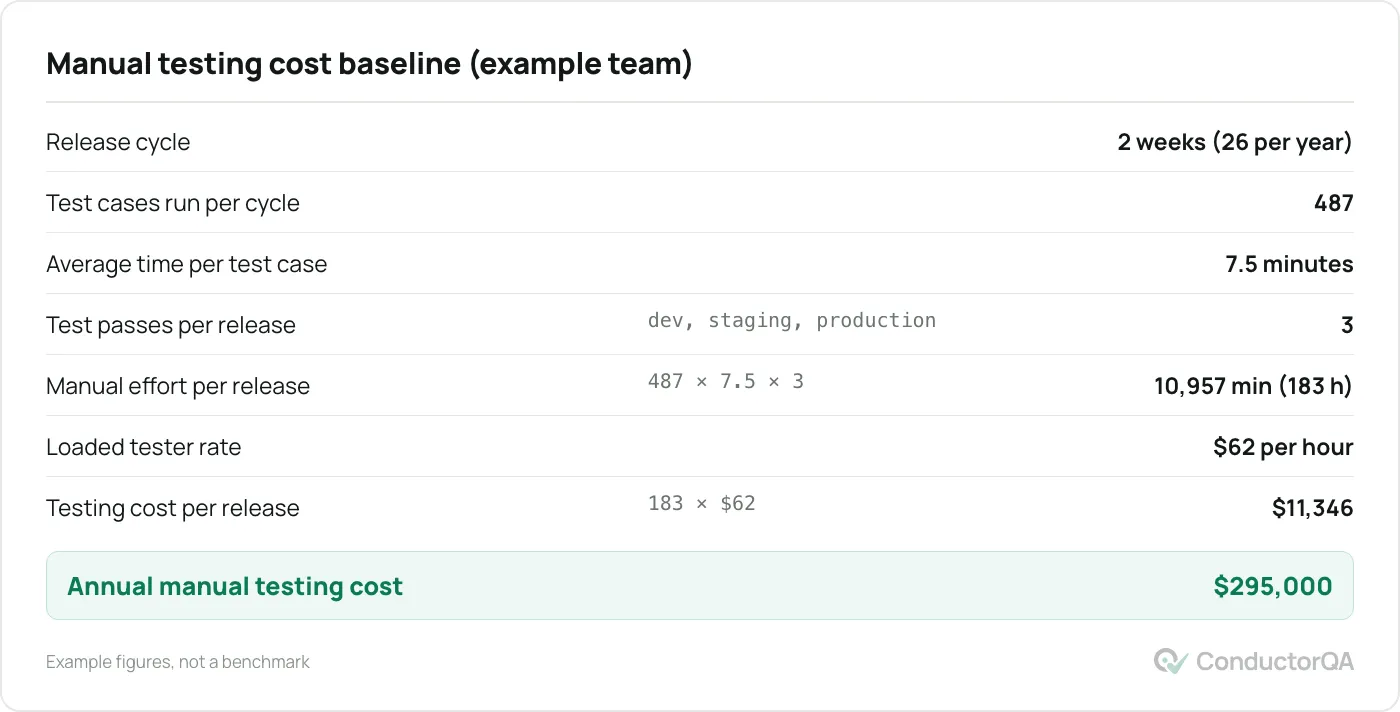
The figures below describe an example team: a product with 487 manual test cases, released every two weeks, tested on three environments before each release. The numbers are illustrative, not a benchmark.
Step 1: Establish the manual testing baseline
Track the current cost for two or three release cycles before you estimate anything. You need hours per release, the number of test cases, the number of test passes, and the loaded hourly cost of the people running them.
Step 2: Count the automation investment
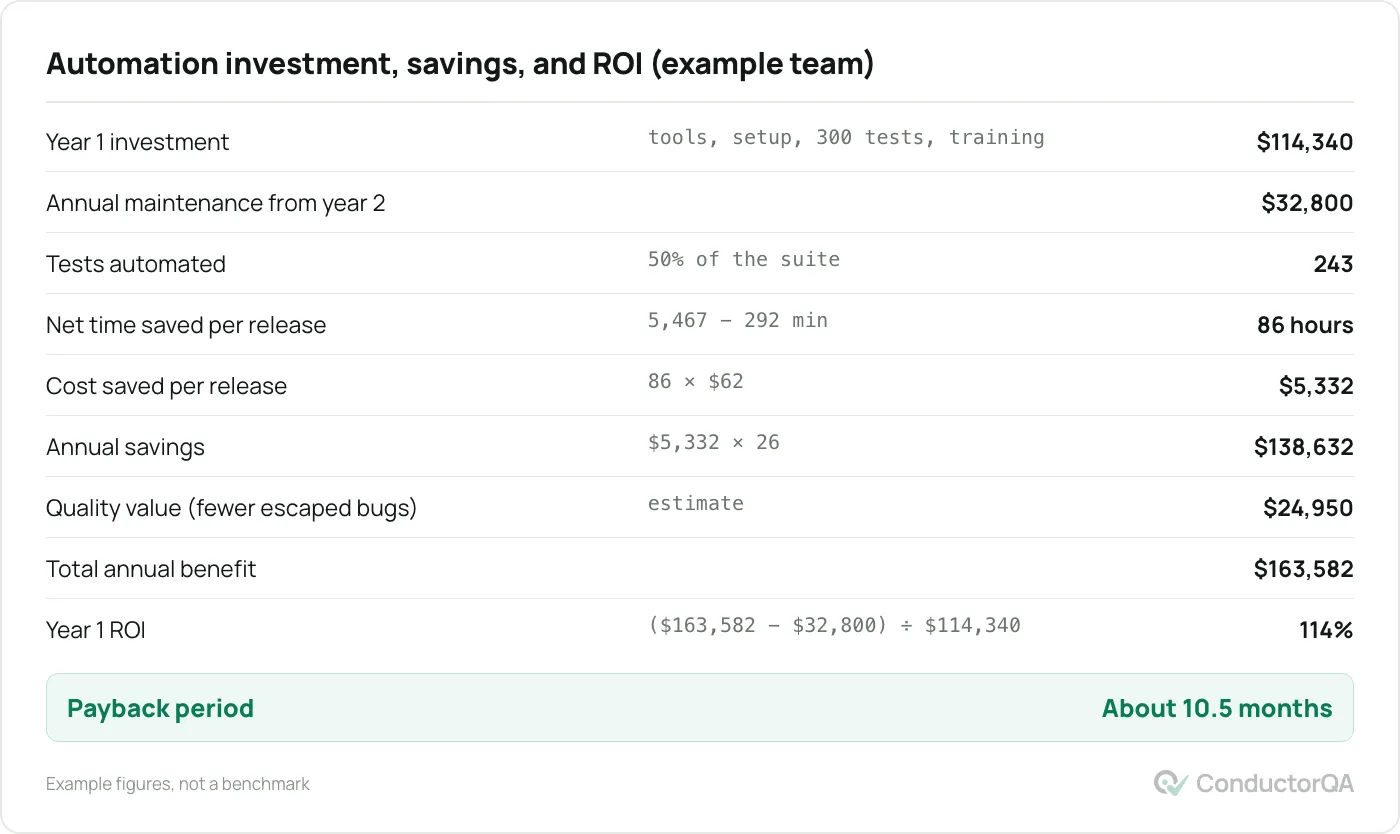
Count everything, not only licenses: tooling and infrastructure, framework setup, the hours to write each test, training, and the annual maintenance once the suite exists. Underestimating this step is the most common reason an ROI projection disappoints.
Step 3: Project savings at realistic coverage
Do not assume the whole suite gets automated in year one. Start with the critical paths: sign-in, payment, and the two or three flows that generate revenue. In the example, the team automates half the suite in year one.
Step 4: Calculate ROI and payback period
The formula is the same for any investment:
ROI = (annual benefit − annual cost) ÷ total investment × 100
Payback period = total investment ÷ (annual benefit − annual cost)
The example returns 114 percent in year one with payback in about ten and a half months. Notice what makes it work: 26 releases a year, 487 existing test cases, and a loaded tester cost of $62 an hour. Change any of those and the result moves a long way.
Mistakes that inflate the result
- Ignoring maintenance. Plan for 20 to 35 percent of the initial writing effort every year, more if the user interface changes often.
- Assuming full coverage on day one. Automating everything at once produces brittle tests and a team that stops trusting the results. See why flaky tests happen and what to do about them.
- Skipping the learning curve. Allow several months for a team to become fluent in a test framework. Those hours are part of the investment.
- Counting hours a tool saves rather than hours a person saves. If nobody was doing the manual testing before, there are no hours to save. The benefit is quality, and that needs a separate, conservative estimate.
When a small team should not automate yet
Run the example with a five-person team that releases weekly, has no written test cases, and has nobody whose job is testing. The manual baseline is close to zero, so the savings are close to zero, and the whole investment lands on the cost side. For that team, test automation ROI is negative for at least the first year.
What that team needs first is coverage, not automation: a written list of what to test, a pass through every flow on a phone and a desktop before each launch, and a bug list ranked by what matters. Automation pays off later, once the product has stabilised and the same flows are being checked release after release. End-to-end testing for small teams covers how to decide when that point has arrived.
Where ConductorQA fits
For a team at the “no baseline yet” stage, a fixed-price audit covers the ground a test suite would cover, without the setup. Our QA team tests every route on phone and desktop, reproduces each bug by hand, and returns a ranked report within 48 hours of a scheduled start slot. The pre-launch QA audit starts at $750, which is a useful number to put next to the year-one investment figure above.
Frequently asked questions
Is test automation worth it for a startup?
Usually not in the first year. Automation returns value when the same flows are tested release after release and the manual cost is real. A startup still changing its product every week pays the maintenance cost without collecting the savings. Get the flows stable and the test list written first.
What is a good ROI for test automation?
There is no standard figure. A positive year-one result with payback under a year, like the example above, is strong. A negative year-one result with payback in year two is normal for a suite built properly. Be suspicious of projections above a few hundred percent, because they usually omit maintenance.
Is there a test automation ROI calculator?
The two figures in this article are the calculator. Replace the example values with your own release count, test case count, time per case, and loaded hourly rate, then apply the two formulas in step 4. If you want the inputs as a spreadsheet, the free QA templates include a test case sheet that gives you the case count and timing columns.
How do you measure the quality value of automation?
Count escaped bugs before and after automation, and price each by the cost to fix it after release plus any revenue lost while it was live. Keep the estimate conservative and show it separately from the hours saved, so a sceptical reader can accept the hours figure even if they doubt the quality figure.