
QA vs UAT: who tests what before a client handoff
QA vs UAT explained: where QA ends and user acceptance testing begins, a UAT checklist for agencies, and how to stop a client finding P0 bugs on their own.
 By Arun, QA Lead
QA vs UAT: two different questions
QA vs UAT comes up most often at agencies and small teams handing a web app to a client. Quality assurance, QA, asks whether the software works the way it was built to work. User acceptance testing, UAT, asks whether the software does what the client actually needed. A build can pass every QA check and still fail UAT, because the client discovers the feature does not match what they meant when they asked for it.
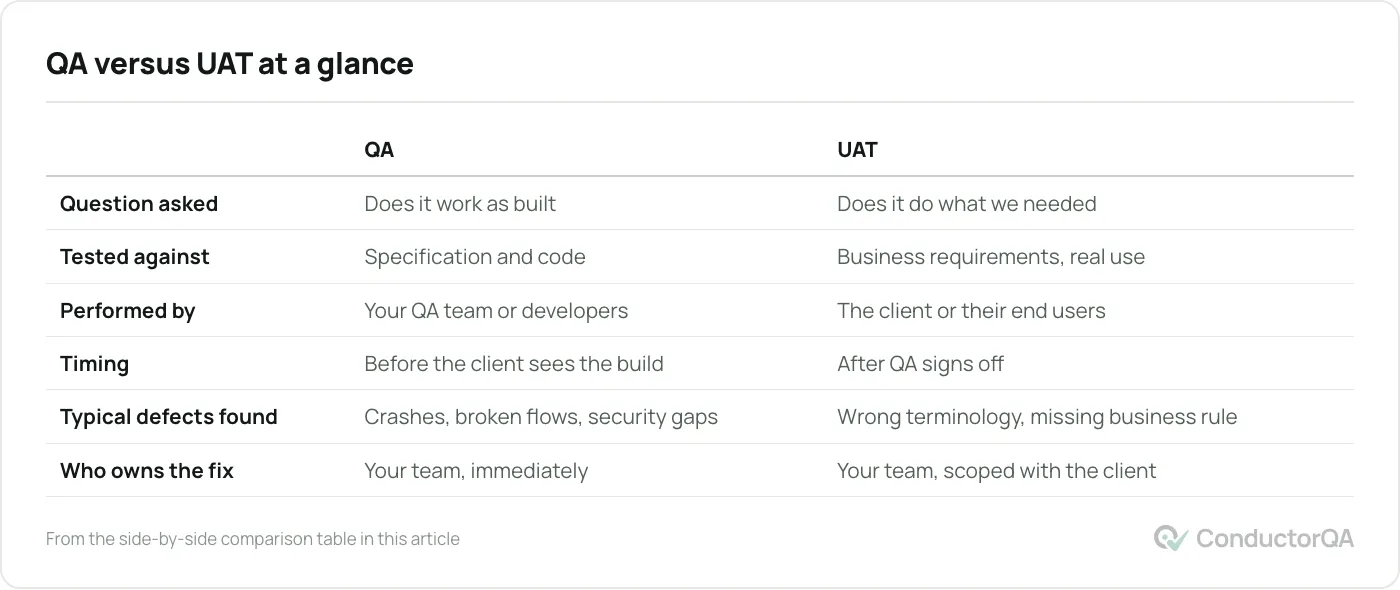
The two activities test different things, in a different order, performed by different people. Confusing them is what leads to a client finding a broken checkout flow during their own review, after your team already called the build done.
What QA covers
QA is the internal verification pass your team runs before anything reaches the client. It is built against the specification and the code, not against the client’s expectations, because at this stage the client has not seen the build yet.
QA typically covers:
- Functional testing: does each feature do what the ticket or spec described.
- Negative testing: what happens with invalid, empty, or malicious input.
- Cross-browser and cross-device testing: does the app render and behave correctly on the browsers and devices the audience actually uses.
- Regression testing: did a new change break something that used to work.
- Security basics: are protected pages and API routes actually protected, are database access rules correctly scoped.
QA is run by your own developers, testers, or an outside QA team, never by the client. The client should not be the first person to find a P0 bug, a defect severe enough to block launch. For more on how we define that severity scale, see our guide on bug severity vs priority.
What UAT covers
UAT is the client’s own verification pass, run after your QA pass, against their business requirements rather than against the ticket text. The client, or someone standing in for the end user, works through real scenarios and judges whether the result matches what they needed, beyond what was specified in the ticket.
UAT typically covers:
- Business scenarios: does the invoicing flow produce an invoice the client’s accounting process can actually use.
- Terminology and content: does the app use the words and labels the client’s own users expect.
- Workflow fit: does the sequence of screens match how the client’s team actually works, rather than how the ticket described it.
- Edge cases specific to the client’s business, like a tax rule or a regional shipping rule that a generic QA pass would not know to check.
UAT is run by the client, their staff, or a small group of real end users, with your team supporting rather than performing the testing.
QA vs UAT testing: a side-by-side comparison
| QA | UAT | |
|---|---|---|
| Question asked | Does it work as built | Does it do what we needed |
| Tested against | Specification, code | Business requirements, real use |
| Performed by | Your QA team or developers | The client or their end users |
| Timing | Before the client sees the build | After QA signs off |
| Typical defects found | Crashes, broken flows, security gaps | Wrong terminology, missing business rule, workflow mismatch |
| Who owns the fix | Your team, immediately | Your team, scoped and scheduled with the client |
A UAT checklist for agencies
Before you hand a build to a client for UAT, confirm the following. This is not a substitute for your QA pass. It is the minimum you check before UAT even starts, so the client’s first impression is a working app, not a broken one.
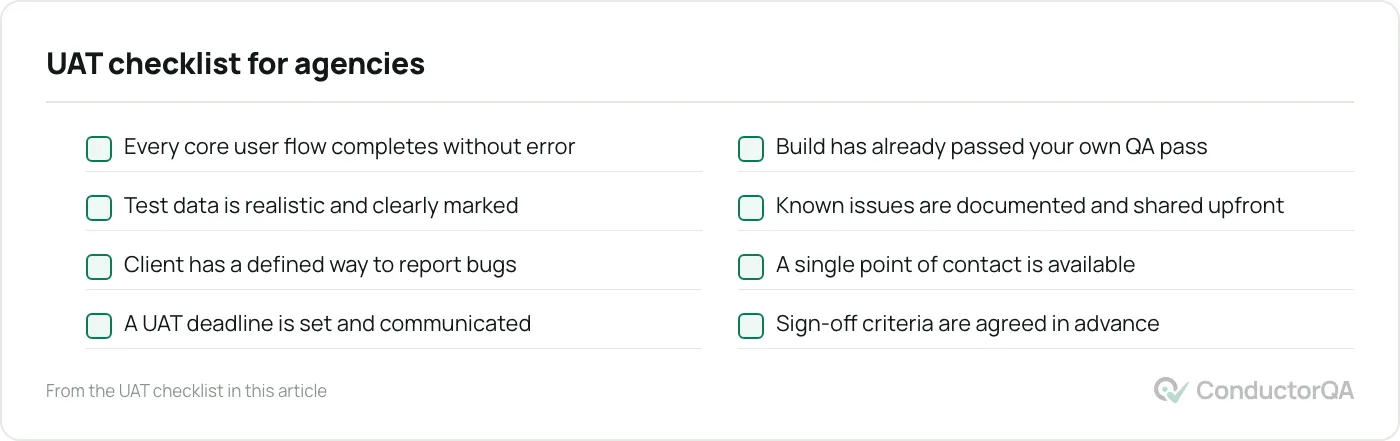
- Every core user flow completes end to end without an error.
- The app has already passed your own QA pass, including a full software testing checklist covering every core flow.
- Test data is realistic and clearly marked as test data, not left-over placeholder content from development.
- Known issues are documented and shared with the client before they start testing, so they are not rediscovering bugs you already know about.
- The client has a defined way to report what they find: a shared sheet, a form, or a bug report template they can fill in without back-and-forth. Our bug report template works well for this.
- A single point of contact on your side is available to answer questions while the client is testing.
- A deadline for UAT is set and communicated, so the review does not drift for weeks.
- Sign-off criteria are agreed in advance: what the client needs to confirm before you consider UAT complete.
How to keep the client from finding P0 bugs
The order matters. A P0 bug reaching the client during UAT means your QA pass missed something severe, and the client’s first experience of the product is a broken one. Three practices reduce that risk:
Run a full regression pass, not a spot check, before every handoff. New features frequently break old ones in ways a brief look will not catch.
Separate the person who built the feature from the person who verifies it. A developer testing their own code tends to test the path they wrote, not the path a confused or adversarial user would take.
Treat the gap between QA sign-off and the UAT handoff as a freeze window. Avoid pushing last-minute changes into the build the client is about to test, since an untested late change is exactly how a P0 bug slips through QA and lands in front of the client.
Common QA vs UAT mistakes
A few patterns account for most of the friction we see between agencies and clients during handoff.
Treating UAT as a second QA pass. When an agency asks a client to “test everything,” the client either tests nothing with any structure or tests the same functional paths your QA team already covered, and misses the business-fit questions only they can answer. Give the client specific scenarios tied to their own workflows, not a blank instruction to click around.
Skipping QA because UAT is scheduled. Some teams treat the client’s review as the real test and let their own QA pass slide. This inverts the order the two activities are meant to run in. QA exists to catch defects before the client’s time is spent on them, and a thin QA pass moves the cost of finding bugs onto the client relationship instead.
No agreed definition of done. Without written sign-off criteria, UAT can continue indefinitely as the client raises new requests that were never part of the original scope. Separate scope changes from UAT findings explicitly, and route scope changes through a change request rather than letting them extend the acceptance window.
Letting the client test an unstable build. If your QA pass is still finding P1 or P0 issues, do not start the clock on UAT. A client who hits a crash in the first five minutes loses confidence in the whole build, even if the rest of the app is solid.
Why the distinction matters for outsourced QA
Teams that outsource testing, whether to a freelancer, an offshore firm, or a fixed-price audit service, sometimes assume the vendor’s report doubles as UAT. It does not. An outsourced QA pass tells you the build works as specified. It cannot tell you whether the specification matched what your client actually wanted, because an outside QA team is working from your tickets and your app, not from the client’s unstated expectations. Budget for both: an independent QA pass to catch functional and technical defects, and a UAT phase where the client confirms fit.
Where ConductorQA fits
If your team does not have a dedicated QA function, or your developers are the ones who built the feature and also the ones signing off on it, an outside pass before UAT closes that gap. Our QA audit gives you an independent bug report, ranked by severity, before the client ever opens the build.
Frequently asked questions
Is UAT the same as QA testing?
No. QA testing vs UAT testing differ in what they check and who performs them. QA verifies the build against the specification and is run by your own team. UAT verifies the build against the client’s actual business needs and is run by the client.
Who should perform UAT, the client or the agency?
The client, or real end users the client designates, should perform UAT. Your agency’s role is to prepare the build, document known issues, and support the client’s testing, not to test on the client’s behalf, since the point of UAT is to confirm the client’s own judgment of fitness for use.
What happens if a client finds a bug during UAT?
Log it the same way you would log any bug, with steps and severity, then scope and schedule the fix with the client rather than patching it silently. A bug found during UAT is normal. A P0 bug that should have been caught during QA is the signal worth reviewing in your own process.
How long should a UAT phase last?
Set a fixed window rather than leaving it open-ended, typically a few days to two weeks depending on the size of the build. An undefined UAT period tends to drift, since there is no natural signal telling the client when review is complete.