
What is smoke testing? A 15-minute post-deploy checklist
What is smoke testing, how it differs from regression testing, and a 15-minute smoke test checklist you can run by hand after every deploy.
 By Bhavana, QA Engineer
What is smoke testing
Smoke testing is a short, surface-level check that confirms a build is stable enough to test further. You run it right after a deploy, before anyone spends time on deeper testing, to catch the kind of failure that would make the rest of the testing session pointless, such as the app not loading or login being broken.
The name comes from hardware testing: turn the device on and check for smoke before testing anything else. In software, the idea carries over directly. What is smoke testing in software development, in practice, is the five to ten critical paths you check first, every time, before anything else.
Smoke testing versus regression testing
These two get confused often, so it is worth being precise.
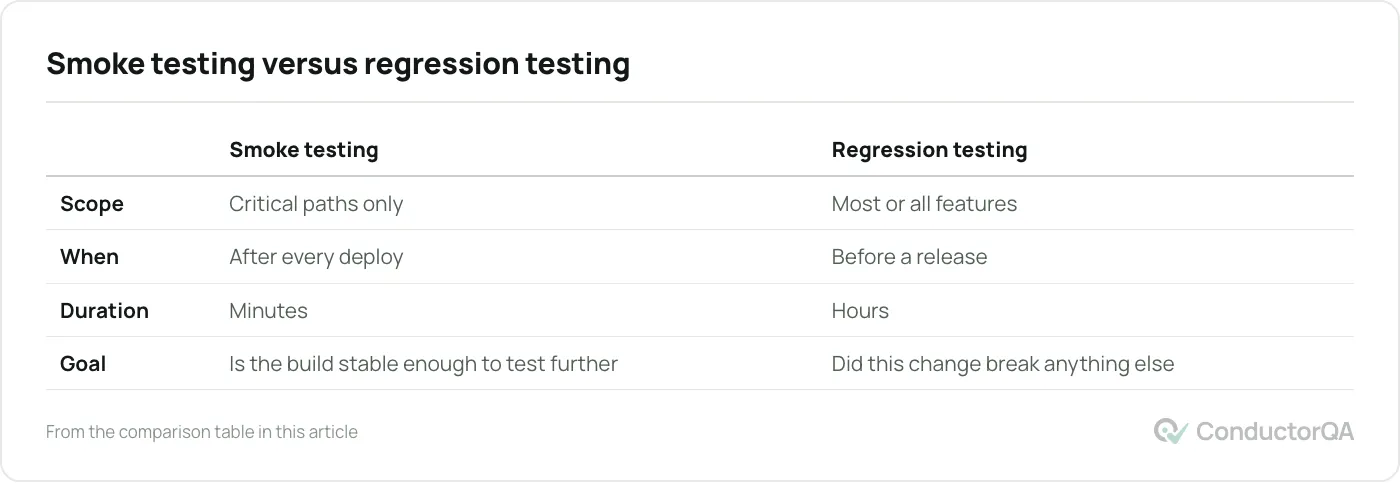
Smoke testing is narrow and fast. It covers the most critical paths in an application, for example signing in, loading the homepage, and completing a core action, and it takes minutes to run. The goal is to answer one question: did this deploy break something obvious.
Regression testing is broad and slower. It covers a much larger set of features to confirm that a change did not break something unrelated and already working. A full regression pass can take hours, and teams usually run it before a release rather than after every single deploy.
The relationship between the two: smoke testing is what you run first, after every deploy, to decide whether the build is worth testing further. Regression testing is the deeper pass you run before a release to confirm nothing else broke. See our regression testing checklist for that deeper pass.
| Smoke testing | Regression testing | |
|---|---|---|
| Scope | Critical paths only | Most or all features |
| When | After every deploy | Before a release |
| Duration | Minutes | Hours |
| Goal | Is the build stable enough to test further | Did this change break anything else |
Why smoke testing matters for small teams
Most small teams we talk to do not have a QA engineer, which means the person who wrote the code is also the person deciding whether it is safe to ship. Without a smoke test, that decision is often “it loaded on my machine,” which is not the same thing as “it works for a new user on a different browser.”
In our experience, the bugs a smoke test catches are rarely subtle. They are things like a broken login form, a checkout button that does not respond, or an environment variable that was never set on the new deploy. These are the bugs that, if they ship, get found by a customer within the hour. A 15-minute check before you walk away from the deploy catches most of them.
The 15-minute smoke test checklist
Run this after every deploy, in order. Each item should take one to three minutes. If something fails, stop and fix it before testing anything else.
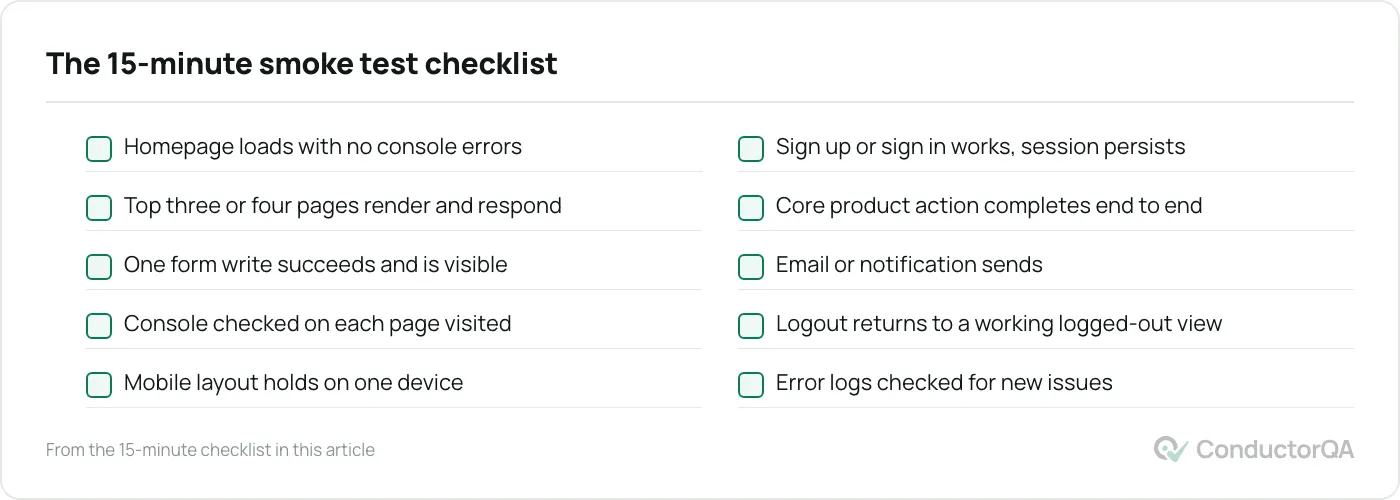
- Load the homepage in a fresh, logged-out browser session. Confirm it loads without a console error and the layout is not broken.
- Sign up as a new user, or sign in with a test account. Confirm the session persists after a page reload.
- Load the three or four pages your users hit most. Confirm each one renders and its primary action (a button, a form, a link) responds.
- Complete the core action of your product end to end. For a SaaS app, this might be creating a project. For a store, it is usually adding an item to a cart and reaching checkout.
- Submit one form that writes to your database. Confirm the write succeeds and the data appears where it should.
- Trigger one email or notification, if your app sends them, and confirm it arrives.
- Check the browser console on each page you visited for errors. See our guide to console errors for what is worth chasing down versus ignoring.
- Log out and confirm you land back on a logged-out view, not a broken or blank page.
- Open the app on one mobile browser, to confirm the layout holds and nothing is cut off.
- Check your error monitoring or server logs for anything new in the last ten minutes.
Smoke test, [date], [build or commit]
[ ] Homepage loads, no console errors
[ ] Sign up / sign in works, session persists
[ ] Top 3-4 pages render and respond
[ ] Core product action completes end to end
[ ] One form write succeeds and is visible
[ ] Email or notification sends
[ ] Console checked on each page
[ ] Logout returns to a working logged-out view
[ ] Mobile layout holds on one device
[ ] Error logs checked for new issues
Result: pass / fail, items failed: ___
What to do when a smoke test fails
Stop testing anything else. A failed smoke test means the build is not stable enough for deeper testing to be useful, since you cannot trust results from a build with a broken login or a page that will not load.
Fix the failure, redeploy, and run the smoke test again from the top. Do not skip ahead to the item that failed only. The point of running the full list again is that a fix for one issue can introduce another, and a short checklist is cheap to repeat.
If the same kind of failure keeps showing up after deploys, for example an environment variable that is not set correctly on your hosting platform, that is worth fixing at the deployment process level rather than catching by hand every time.
Who should run the smoke test
On a small team, this is usually whoever deployed the change, done immediately after the deploy while the context is fresh. It does not require a dedicated tester. The checklist above is written so a developer with no QA background can run it without guessing what to check.
If you are shipping several times a day, consider automating the checklist above into a script or a monitoring check that runs after each deploy. Automating a smoke test is reasonable once the manual version has stayed unchanged for a few weeks, since that stability is a sign the checklist is accurate.
Common mistakes with smoke testing
A few patterns show up often enough in our work that they are worth naming directly.
Treating the smoke test as optional under time pressure. The moments right before a demo or a deadline are exactly when a broken build does the most damage, and they are also when teams are most tempted to skip the check. Run the checklist anyway. It takes 15 minutes, not an hour.
Testing only on the browser and device the developer happens to be using. A layout bug that only shows up on Safari or on a small screen will not show up if you only ever test in Chrome on a laptop. The checklist item about mobile exists for this reason, and it is worth rotating which browser you use for the desktop checks too.
Letting the checklist grow past what a smoke test is for. Once a team starts adding “also check the settings page” and “also check the billing export,” the smoke test stops being a 15-minute check and starts being a regression pass with a different name. If the list takes longer than 20 minutes, move the extra items into a separate regression checklist and keep the smoke test short.
Running the smoke test once, before launch, and never again. A smoke test’s value comes from repetition. The failures it catches are deploy-specific, caused by that day’s change, not fixed defects in the product. A smoke test run once at launch and then forgotten will not catch the environment variable that breaks three deploys later.
Where ConductorQA fits
A smoke test is something your team runs itself, every time, in minutes. A ConductorQA audit is a deeper, one-time pass before a launch, with every route checked by hand and findings ranked by severity. Run your own smoke test after every deploy, and bring in a qa audit before a launch where the cost of a missed bug is higher than a normal week.
Frequently asked questions
What is smoke testing in software testing?
Smoke testing is a short check of an application’s most critical paths, run right after a build or deploy, to confirm the build is stable enough for further testing. It is not a full test of the application, only the parts that would make further testing pointless if broken.
What is smoke testing in software engineering compared to unit testing?
Unit testing checks individual functions or components in isolation, usually written by developers as code. Smoke testing checks the application as a whole, from a user’s perspective, after it has been deployed. The two catch different kinds of problems and are not substitutes for each other.
How often should you run a smoke test?
Run a smoke test after every deploy to a shared environment, including staging, not only before a release. Catching a broken build right after it happens is faster than catching it a day later when more changes have piled on top.
Can smoke testing be automated?
Yes, once the checklist has been stable for a while. Many teams start by running the checklist by hand, then convert the stable parts into an automated check that runs on every deploy. Start manual so the checklist reflects what actually matters before you lock it into code.