
Stripe test cards: numbers for every payment outcome
Stripe test cards for success, declines, 3D Secure authentication, and insufficient funds, with the checkout flow to run against each one before you launch.
 By Kris, Co-founder and Senior Software Architect
 Why stripe test cards matter before launch
If you are testing a checkout flow built on Stripe, you need stripe test cards that trigger specific outcomes: a successful charge, a decline, a 3D Secure challenge, or a failed payment after the webhook fires. Stripe’s test mode accepts a fixed set of card numbers, and each one maps to a documented behavior. You do not need a real card, and you do not need to guess at what a number does. Stripe publishes the full list, and this article covers the outcomes we rely on most often when we audit a checkout flow before launch.
We see the same mistake in almost every app built quickly with an AI coding tool: the team tested the happy path with 4242 4242 4242 4242, watched the charge succeed, and shipped. Nobody tested what happens when a card is declined, when 3D Secure interrupts the flow, or when the webhook that confirms payment never arrives. Those are the paths your customers will hit in production, and they are the paths that cost you refunds, support tickets, and bad reviews.
Stripe test cards for the outcomes you must check
Below are the card numbers we are certain are documented in Stripe’s testing reference. Use any future expiry date (for example 12/34), any three-digit CVC (123), and any postal code. If you need a number or behavior not listed here, look it up in Stripe’s testing documentation before you rely on it. We would rather send you to the source than guess.
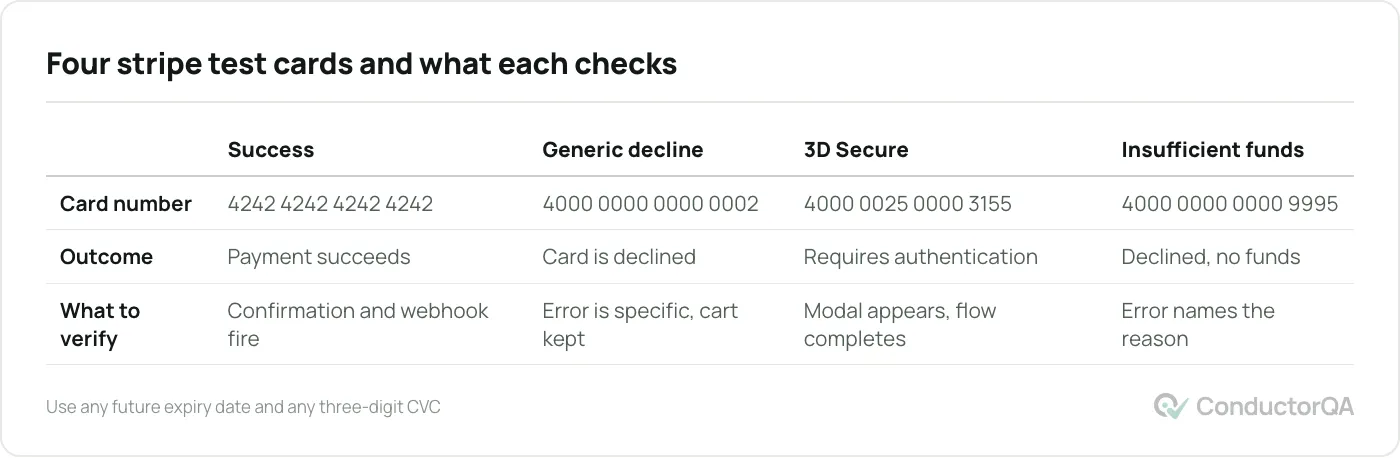
| Card number | Outcome | What to verify in your app |
|---|---|---|
| 4242 4242 4242 4242 | Payment succeeds | Order confirmation screen, confirmation email, webhook received, database order status updated |
| 4000 0000 0000 0002 | Card is declined (generic decline) | Error message is specific and visible, cart is not cleared, user can retry with a different card |
| 4000 0025 0000 3155 | Requires 3D Secure authentication | Authentication modal appears, payment completes after the test challenge is approved, flow does not hang if the challenge is abandoned |
| 4000 0000 0000 9995 | Decline for insufficient funds | Error message distinguishes this from a generic decline where your copy allows it, retry path works |
Each row is a test case, not just a number. A checkout flow that only handles row one is not tested. It is demonstrated once, under ideal conditions.
The checkout flow to run against each card
For every card above, run the same sequence and confirm each step:
- Add an item to the cart and proceed to checkout.
- Enter the test card number, a future expiry, and any CVC.
- Submit the payment.
- Observe the on-screen result: success page, decline message, or authentication prompt.
- Check your payment processor’s dashboard (Stripe’s test mode dashboard) for the event.
- Check your application’s webhook logs to confirm the event arrived and was processed.
- Check your database or admin panel for the resulting order or subscription state.
- If the test was a decline, confirm the cart contents are preserved and the customer can retry.
Steps 5 through 7 are the ones most teams skip. A success message on screen does not prove the webhook fired, and a webhook that never arrives means your system thinks the order never happened even though Stripe charged the card.
Testing 3D Secure authentication
3D Secure is a second authentication step, often a bank-issued prompt, that some cards and some regions require by default. The test card 4000 0025 0000 3155 triggers Stripe’s test version of this challenge. When you use it, confirm three things: the authentication modal appears without breaking the page layout, the payment completes after you approve the test challenge, and the flow recovers gracefully if a customer closes the modal without completing it. That last case is common in production. A customer gets the bank prompt, hesitates, and closes the tab. Your app should leave them with a clear retry path, not an order stuck in limbo.
Testing declined payments and insufficient funds
A decline is not a single behavior. Stripe’s test cards let you separate a generic decline (4000 0000 0000 0002) from an insufficient funds decline (4000 0000 0000 9995). Your application does not need different code paths for every decline reason, but your error copy should not claim something that is not true. Telling a customer “your card has insufficient funds” when the actual reason was a generic decline is a support ticket waiting to happen. At minimum, confirm that any decline leaves the cart intact, surfaces a message the customer can act on, and does not silently retry the charge.
What webhook testing adds on top of card testing
Card testing confirms what the customer sees. Webhook testing confirms what your backend does after Stripe sends the event. These are different failure modes. A checkout can show a success page while the backend never marks the order as paid, because the webhook endpoint returned an error, timed out, or was never registered for that event type in test mode. If your application depends on webhooks to unlock a feature, start a subscription, or send a receipt, test that dependency directly rather than inferring it from the screen. For a full walkthrough of simulating and verifying webhook delivery, see our guide on webhook testing.
Common mistakes when testing stripe test cards
We see a few patterns repeat across the checkouts we audit:
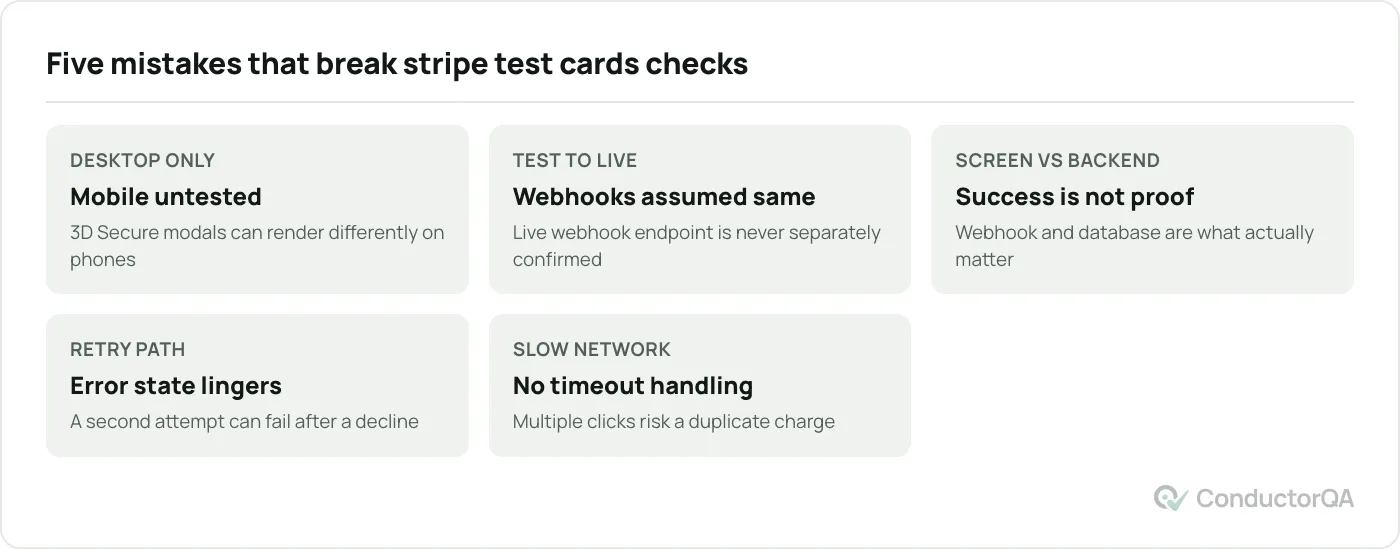
- Testing only on desktop. Mobile browsers handle the 3D Secure redirect differently, and a modal that renders fine on a laptop screen can clip or scroll incorrectly on a phone. Test the same cards again on at least one mobile browser.
- Clearing test mode data and assuming production will behave the same. Test mode and live mode use separate webhook endpoints in some integrations. Confirm your live webhook endpoint is registered for the same events before launch, not just the test one.
- Treating a successful on-screen message as proof the order is complete. As covered above, the webhook and the database record are the parts that matter to your business, not the confirmation page.
- Skipping the retry path. A customer whose card is declined will often try again with a different card within the same session. If your form does not clear the error state correctly, the second attempt can fail even with a valid card.
- Not testing what happens when Stripe itself is slow. A checkout that has no loading state or timeout handling can let a customer click submit multiple times, which risks duplicate charges if your idempotency handling is incomplete.
Building this into your release process
Card testing against a payment flow is not a one-time task you complete before the first launch and never repeat. Any change to the checkout page, the payment form library, or the webhook handler is a reason to run through the table above again. If your team ships weekly, add a short payment smoke test, success, one decline, and the 3D Secure case, to your regular pre-release checks. Our test plan template includes a section for payment flows you can adapt directly, so you are not rebuilding the checklist from scratch every release.
Where ConductorQA fits
Running every card above against every checkout path in your app, on both desktop and mobile, across the browsers your customers actually use, takes longer than most teams expect and is easy to under-scope under a launch deadline. If you want an independent pass before you go live, our pre-launch QA audit covers payment flows as a standard part of the review, with every finding reproduced and documented.
Frequently asked questions
What is the stripe test cards number for a successful payment
The stripe test cards number for a standard successful payment is 4242 4242 4242 4242. Use any future expiry date and any three-digit CVC. This card works in test mode only and will not process a real charge.
Do stripe test credit cards work in live mode
No. Stripe test credit cards only work when your account or integration is in test mode, using your test API keys. If you submit a test card number against your live keys, Stripe rejects the request. This separation is intentional and prevents test traffic from reaching real payment rails.
How do I test a declined payment in Stripe
Use one of Stripe’s documented decline cards, such as 4000 0000 0000 0002 for a generic decline or 4000 0000 0000 9995 for insufficient funds, in test mode. Submit the card through your actual checkout form rather than through Stripe’s dashboard, so you are testing your own application’s handling of the decline, not just Stripe’s behavior.
What card number tests 3D Secure in Stripe
4000 0025 0000 3155 triggers Stripe’s test 3D Secure authentication challenge. Use it to confirm your checkout displays the authentication prompt correctly and handles both completion and abandonment of that prompt.