
Test plan template: the format plus a worked example
A copyable test plan template in Markdown, a fully filled-in example for a five-person SaaS team's billing launch, and which sections to drop when unread.
 By Arun, QA Lead
What a test plan template needs to cover
A test plan template is a reusable outline for what you are going to test, how, and when, before you write a single test case. Used well, it answers five questions up front: what is in scope, what is deliberately out of scope, who tests what, what environment and test data you need, and what has to be true before you call the release done. Used badly, it is a document someone fills in once and never opens again.
The test plan template below is the one we hand to teams with no dedicated QA engineer. It is short on purpose. A test plan template for software testing that takes an afternoon to complete will not survive contact with a real launch schedule, and a plan nobody reads is worse than no plan, because it creates the feeling of coverage without the coverage.
If you searched for a template for test plan documentation expecting something with a dozen sections and a sign-off matrix, most of that length does not pay for itself on a team under ten people. The sections below are the ones we have seen actually get used.
The test plan template
Copy the block below into a Markdown file, a Word document, or a shared doc. Every section is optional in the sense that you can delete one you have no use for, but delete it on purpose, not by accident.
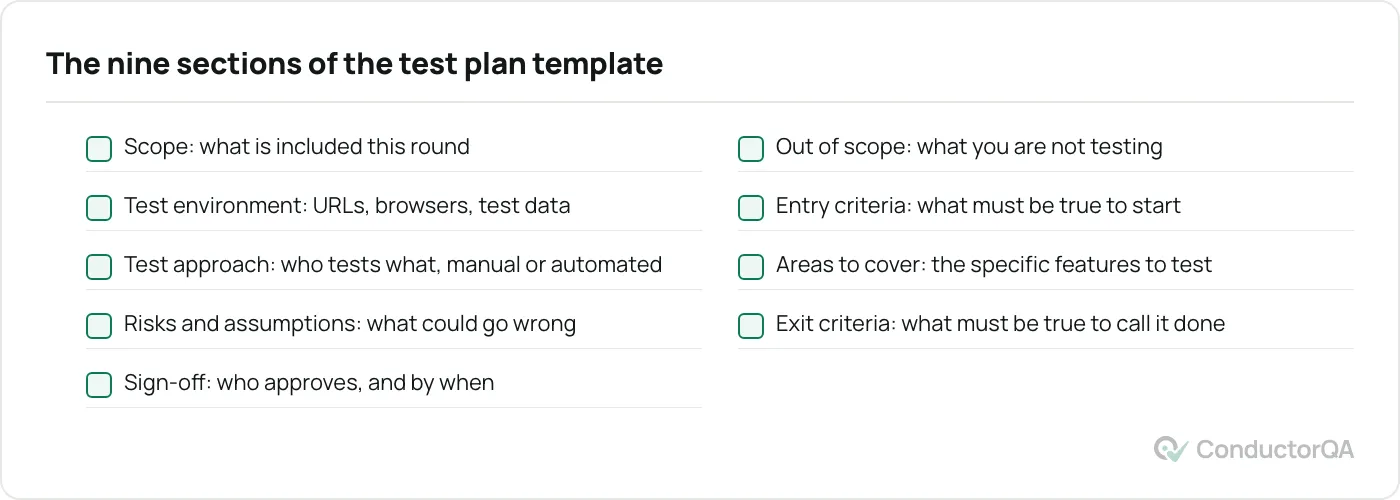
# Test Plan: <feature or release name>

## Scope
What is included in this test pass. Name the specific pages, routes, or features.

## Out of scope
What you are deliberately not testing this round, and why.

## Test environment
URL(s), browsers, devices, test accounts, and test data you need.

## Entry criteria
What has to be true before testing starts (for example: feature deployed to
staging, migrations run, test accounts seeded).

## Test approach
Which areas get manual testing, which get automated checks, and who owns each.

## Areas to cover
- Area 1:
- Area 2:
- Area 3:

## Risks and assumptions
What could go wrong with this plan, and what you are assuming is already true.

## Exit criteria
What has to be true to call testing done (for example: no open P0 or P1 bugs,
all P2 bugs triaged and assigned).

## Sign-off
Who approves the release, and by what date.
That is the whole template. A test plan template in software testing earns its length only when more than one person has to follow it. If you are a solo founder testing your own release, several of these sections collapse into a sentence, which is fine. We cover which ones in the section after the example.
A filled-in example: a five-person SaaS team launching a billing feature
The example below is fictional. The team, the product, and the names are invented to show how the template fills in, not to describe a real company. Replace every line with your own facts before you use it.
Assume a five-person SaaS team called Northwind is shipping usage-based billing: a new checkout flow, a Stripe integration, invoice generation, and plan upgrade and downgrade. Here is their filled-in plan.
# Test Plan: Usage-based billing launch

## Scope
- New billing page and checkout flow
- Stripe subscription creation, upgrade, and downgrade
- Invoice generation and the invoice PDF
- Webhook handling for payment success, failure, and subscription changes
- Cancellation flow

## Out of scope
- The existing free-tier signup flow (tested in the prior release, unchanged
  by this work)
- Marketing site pricing page copy (owned by a separate task)

## Test environment
- Staging URL: staging.northwind.example
- Browsers: Chrome and Safari on macOS and Windows, Safari on iOS
- Test accounts: one free-tier, one pro-tier, one enterprise-tier
- Stripe test mode keys, three test card numbers covering success, decline,
  and insufficient funds

## Entry criteria
- Billing feature deployed to staging
- Database migration run and verified on staging
- Stripe test mode keys configured and webhook endpoint registered

## Test approach
- Two engineers manually test checkout, upgrade, and downgrade across the
  browser list above
- One engineer runs the existing automated regression suite against staging
- The product manager runs an exploratory pass on the billing UI and copy
- The founder reviews invoice PDFs and cancellation copy for accuracy

## Areas to cover
- New subscription checkout, all three test cards
- Plan upgrade, mid-cycle
- Plan downgrade, mid-cycle
- Failed payment handling and the retry prompt shown to the user
- Webhook delivery and retries when the endpoint is briefly unavailable
- Invoice PDF generation and the line items it shows
- Proration math on upgrade and downgrade
- Cancellation flow and what the user sees afterward

## Risks and assumptions
- We are assuming Stripe's test mode webhook behavior matches production
  closely enough to trust the result
- We are assuming the migration is additive only and does not affect
  existing paid accounts
- Risk: proration math has not been checked against a manually calculated
  example yet

## Exit criteria
- Zero open P0 or P1 bugs
- Every P2 bug has a ticket and an owner
- Proration math checked against three manually calculated examples and
  matches

## Sign-off
- Founder approves after reviewing the bug list, target date: the Friday
  before the public announcement
Notice what did not make the list: there is no separate performance testing section, because Northwind is not expecting a traffic spike from this change, and no accessibility section, because that already runs as part of their standing checklist elsewhere. A test plan template of this kind should name what this release actually needs, not every category a textbook might list.
Which sections to drop when nobody will read them
A test plan template for software testing is supposed to save time, not create a ritual. Here is what we tell teams to cut based on size.
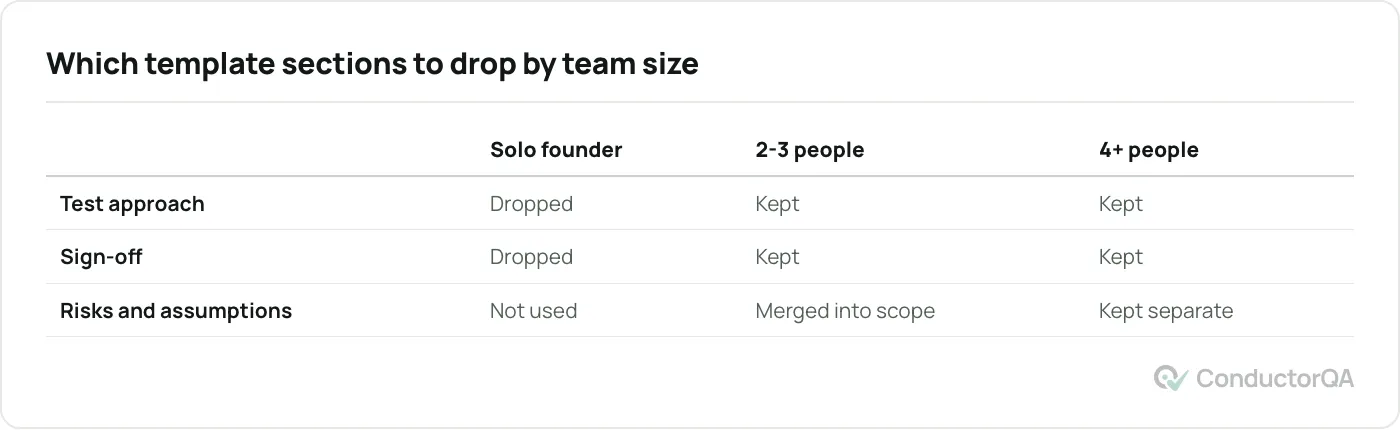
- Solo founder, one release: drop Test approach and Sign-off entirely. You already know who is testing and who is approving. Keep Scope, Entry criteria, and Exit criteria, because those three prevent the most common failure: shipping before you meant to.
- Two to three people: merge Risks and assumptions into Scope as a short note. Keep everything else.
- Four or more people, or an outside reviewer involved: keep the full template. The more people touching a release, the more a one-line scope note saves everyone from re-asking the same question in a different channel.
If someone hands you a template of test plan with twelve sections and a RACI chart, you have permission to delete nine of them for anything short of a multi-team, multi-week release.
A software test plan template for Word users
If your team or a client expects a Word document rather than Markdown, the same template works unchanged. Paste the ## headings in as Heading 2 styles, turn the ## Areas to cover list into a bulleted list using Word’s built-in list style, and keep any tables you add to two or three columns so they read cleanly when printed or exported to PDF. Nothing about the structure above depends on the file format. The content is the part that matters, and a testing test plan template that only exists as a polished document nobody fills in correctly is no better than a blank page.
Where ConductorQA fits
A test plan tells your team what to check and when. It does not replace an independent pass by someone who did not write the code and is not under the same deadline pressure. If you want that pass before a launch, our pre-launch QA audit covers the routes you name in your Scope section, reproduced by hand on real phones and browsers, with a severity-ranked report back within 48 hours of your scheduled start slot. If you would rather start from a document than a blog post, our free QA templates include a spreadsheet version of the plan above alongside a software testing checklist and guidance on how to write test cases once your plan names the areas to cover.
Frequently asked questions
What is a test plan template used for?
A test plan template gives a team a consistent format for deciding what to test, who tests it, what environment to use, and what has to be true before a release ships. It replaces a fresh conversation about scope every time with a document the team fills in once per release.
Do I need a test plan template for a small release?
Yes, but a short one. Even a solo founder benefits from writing down scope, entry criteria, and exit criteria before testing starts, because those three sections prevent the most common mistake: shipping before the agreed bar was actually met.
What is the difference between a test plan and a test case?
A test plan describes the overall scope, approach, and criteria for a round of testing. A test case is one specific, repeatable check within that plan, with its own steps and expected result. The plan says what areas to cover, the test cases say exactly how to check each one.
Can I use this test plan template in Word or Google Docs?
Yes. Paste the headings in as Heading 2 styles and keep the bulleted lists as plain bullets. The structure does not depend on Markdown, and the same sections work in a shared doc, a wiki page, or a plain text file.