
Testing a web application: a guide for teams without QA
What testing a web application covers for small teams: functional checks, payments, errors, security basics, and what to automate or outsource.
 By Bhavana, QA Engineer
What testing a web application covers for a small team
Testing a web application means checking that it does what it is supposed to do, on the devices and browsers your users actually have, before you ask them to trust it with their data or their money. For a founder or a small team without a QA engineer, that work usually falls into five categories: functional testing, layout and cross-browser checks, payment testing, error handling, and a short list of security checks. This guide covers all five and says which ones to automate, which to check by hand before every release, and which ones are worth paying someone else to do.
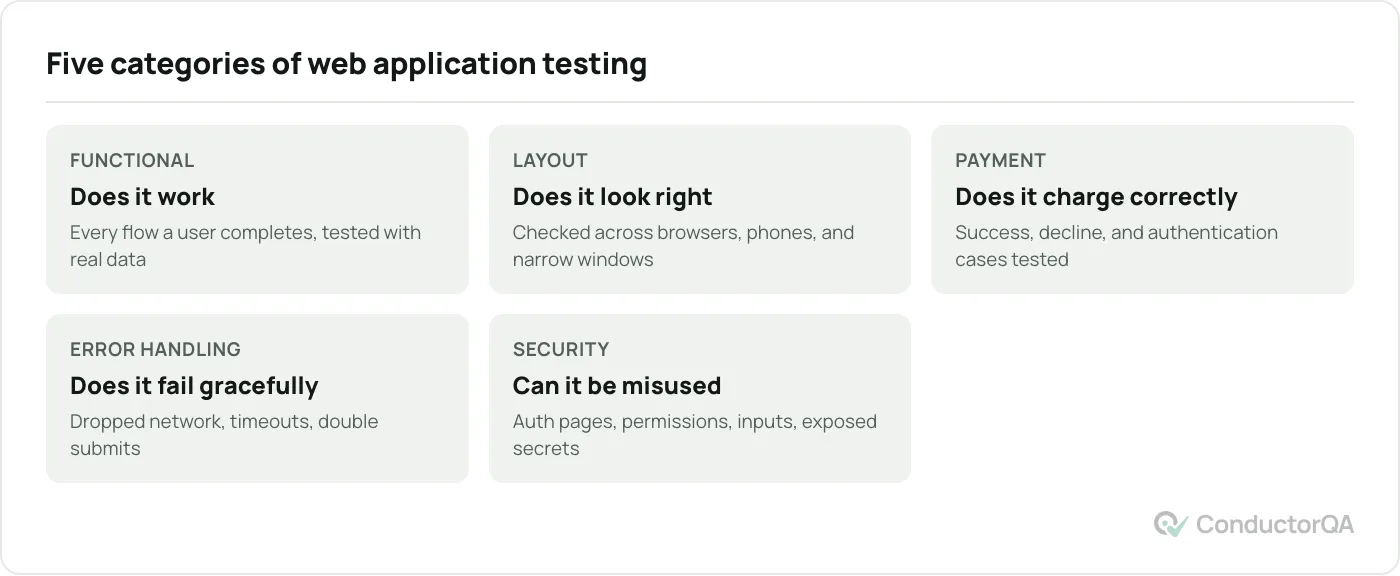
Many teams building with AI coding tools such as Lovable, Bolt, Cursor, or Replit ship fast and test only the happy path they just built, or skip testing a web application altogether until a user reports a problem. The gaps show up later, in a support inbox or a failed payment, instead of before launch.
Functional testing: does every flow work
Functional testing checks that each feature does what the product is supposed to do: sign up, sign in, create a record, edit it, delete it, search for it, filter it, export it. Start with the flows a user has to complete to get value from the product, not the ones that were hardest to build.
A practical way to scope this: list every page and every action a user can take on it. For each action, write one line for what should happen when it works and one line for what should happen when the input is wrong. That second line is where most bugs live. Our software testing checklist has a release-ready version of this list you can copy, and we keep a set of copyable checklists like it on our free templates page.
Test with real data, not placeholder data
Many functional bugs only appear with data that looks like what a real user would enter: long names, special characters, empty optional fields, a search that returns zero results. Running through a flow once with “test test test” in every field will not catch these.
Layout and cross-browser checks
A web application that works in Chrome on a laptop can still break in Safari on an iPhone, in a narrow browser window, or when the user’s operating system is set to a larger default font size. Layout bugs are one of the most common findings in a pre-launch review of apps built quickly with AI tools, because the builder usually tested only on the screen in front of them.
At minimum, check your core flows on:
- Chrome and Safari on desktop
- Safari on iOS, since it carries most consumer mobile traffic
- Chrome on Android
- A desktop browser window resized to a narrow width, not only a phone emulator
Payment testing: the category that costs money when it breaks
If your application takes payments, test that flow more carefully than any other part of the product. A broken checkout does not just lose a sale. It can charge a customer the wrong amount, let someone through without paying, or fail silently and leave you finding out from a support ticket.
Use your payment provider’s test cards to run through a successful charge, a declined card, a card that requires authentication, and a subscription that renews and then fails to renew. Our payment testing guide walks through specific test cards and scenarios to cover before you take checkout live.
Error handling and edge cases
Testing a web application is incomplete if it only checks that things work when everything goes right. Check what happens when:
- The network drops in the middle of a request
- An API call times out or returns an error
- A user submits a form twice by clicking fast
- A session expires while a form is half filled in
Open the browser console while you test. A clean console is a good sign. Errors that only show up there, and never reach the user, are often the first clue of a bug that will surface somewhere else later. Our guide to console errors explains which ones to ignore and which ones to treat as real bugs.
Security testing for a web application
You do not need a dedicated security team to catch the problems that show up most often in web applications built quickly. A short list of checks, done by hand, covers most of what matters for web application testing security on a small app, without requiring dedicated web application security testing software or a formal audit:
- Auth pages: can you reach a signed-in page by typing its URL directly, without signing in first? Does signing out end the session, or does the back button let you back in?
- Permissions: can one account see or edit another account’s data by changing an ID in the URL or an API request? This kind of permissions gap is the most common finding when we do security testing on a web application that serves more than one account.
- Input handling: does a form field that includes a script tag or quote marks break the page, get stored as entered, or get rejected cleanly? This is security testing in a web application at its most basic, a handful of deliberately bad inputs, not a full scan.
- Secrets in the client: open the browser’s developer tools and check the page source and network requests for API keys, database credentials, or admin routes that should never reach the browser.
This is not a substitute for a full web application security testing engagement if you handle sensitive data such as health or financial records. For most small SaaS apps and stores, these four checks catch the mistakes that are common in apps generated or scaffolded quickly, and they take under an hour.
What to automate and what to test by hand
| Testing type | Check by hand before each release | Worth automating |
|---|---|---|
| Sign-up and sign-in flow | Yes, especially after an auth change | Yes, once the flow is stable |
| Payment flow | Yes, every release | Yes, for the standard success and decline cases |
| Layout across browsers | Yes, spot-check the core pages | Rarely worth it for a small app |
| Form validation and error states | Yes | Partially, for the cases you keep breaking |
| Security checks (auth, permissions, secrets) | Yes | No, these need a person judging behavior |
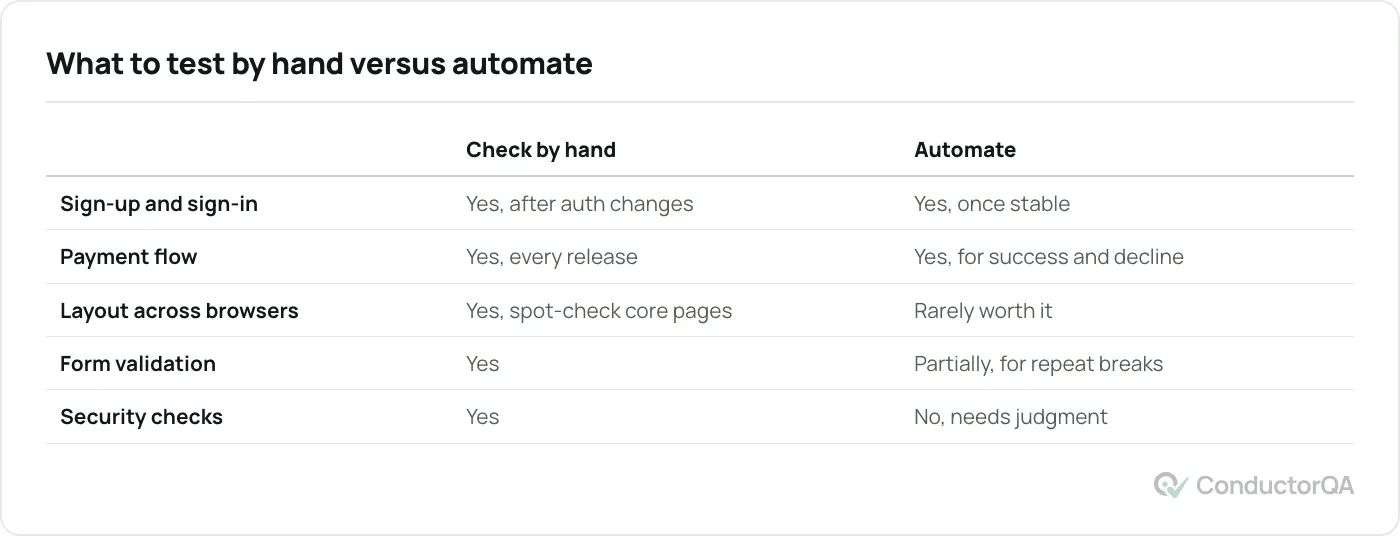
A small, well-chosen automated suite is worth building once a flow has stopped changing week to week. Before that point, automation mostly tests code you are about to rewrite.
When to bring in outside testing
If you are shipping your first real release and have no QA background on the team, a practical option is a one-time outside check before launch rather than building an internal QA process from nothing. See our breakdown of QA outsourcing for small teams for when that trade-off makes sense and when it does not.
Where ConductorQA fits
Our team runs this kind of pass by hand, on real phones and browsers, for teams that do not have the time or the QA background to cover it themselves before a launch. If you want a second set of eyes before you ship, our pre-launch QA audit covers functional, layout, payment, and error testing, with every finding ranked by severity in a report delivered within 48 hours.
Frequently asked questions
What is web application security testing software?
Web application security testing software scans an app for known vulnerability patterns, such as unescaped input or exposed endpoints, usually as part of a larger security program. Most small teams do not need it before launch. The manual checks in this guide, covering auth, permissions, input handling, and secrets, catch the issues that show up most often in apps built quickly.
How is testing a web application different from testing a mobile app?
A web application runs in a browser, so testing has to cover multiple browsers, window sizes, and operating systems rather than a fixed set of device screens. A native mobile app testing checklist focuses more on device hardware, app store review, and offline behavior. Many of the same functional and error-handling checks apply to both.
Do we need a QA engineer to start testing a web application?
No. A small team can cover most of this guide with a written checklist and an hour or two before each release. The categories that benefit most from outside help are payment flows, cross-device layout, and security checks, since mistakes there are easy to miss and expensive to leave in production.
What is the difference between functional testing and security testing in a web application?
Functional testing checks that a feature works as intended for a normal user. Security testing in a web application checks what happens when someone tries to misuse a feature, reach data they should not see, or bypass a control. Both matter, and neither replaces the other.